¶ Hardware Features
CPU: Intel(R) Core(TM) Ultra 5 235T
GPU: Arrow Lake-U [Intel Graphics]
RAM: 16GB
DISK: SAMSUNG NVMe SSD MZVL8512HELU-00BH1
¶ Installation
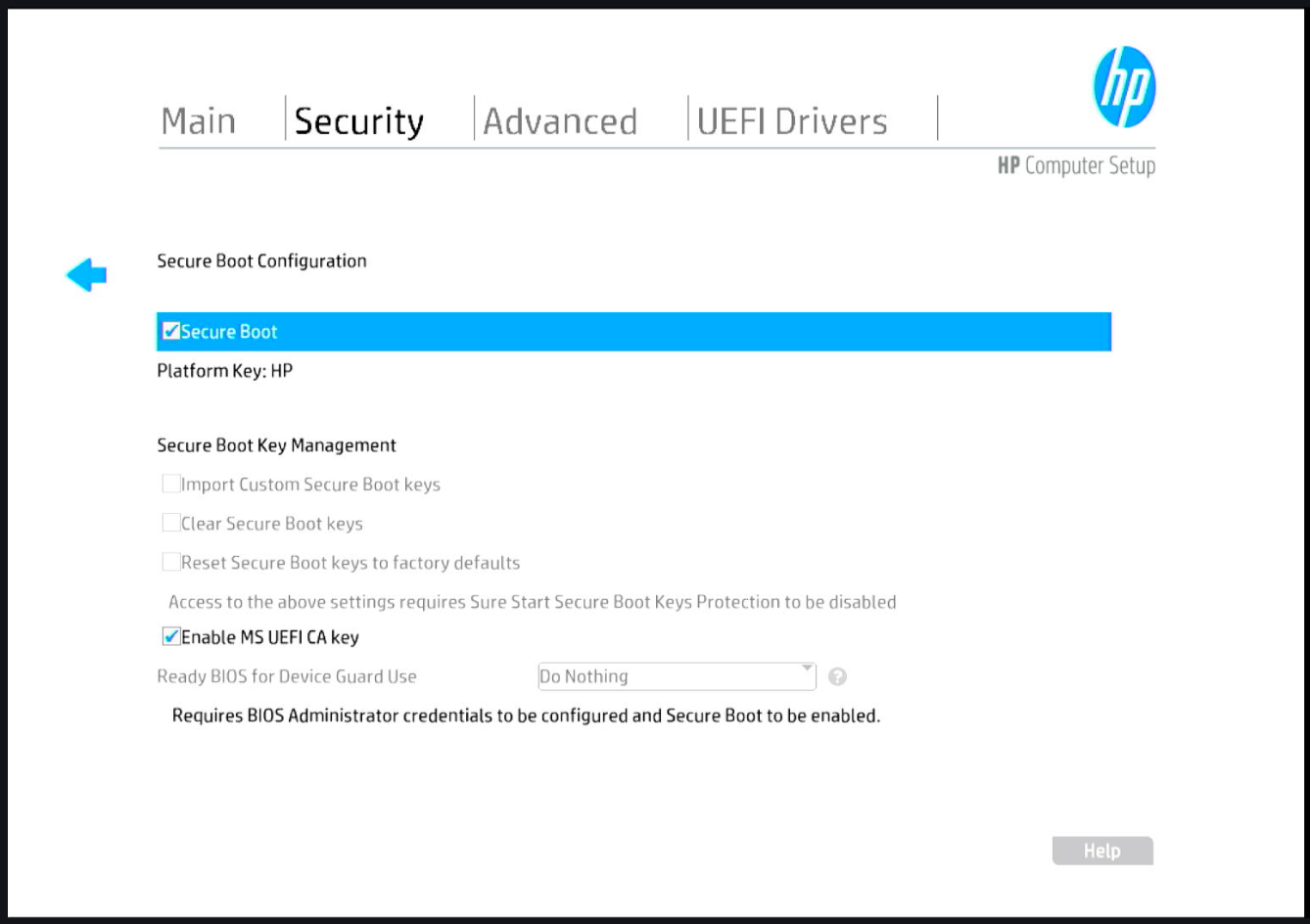
Secure Boot must be configured to use the "MS UEFI CA key", otherwise the USB flash drive will not be recognized.
It is necessary to use Ubuntu installation image 5.1.2 or later.
¶ Secure Boot Configuration
- Press F10 to modify BIOS settings
- Go to "Security" → "Secure Boot Configuration" and enable "Enable MS UEFI CA key"
- Save the changes
The Ubuntu Player is installed via USB drive and setup wizard; no additional drivers are required.
All devices work correctly (GPU, LAN, Wi-Fi, audio), however some libraries used by the Player (e.g. hardware video decoding) do not work correctly with Player versions <= 4.21.0.
¶ Incompatibilities
Up to Player version 4.21.0, when videos are played with hardware acceleration enabled, they are displayed with horizontal bars.
To play videos correctly, hardware acceleration must be disabled by configuring the playout with:
render driver: internal/v4media driver: opengl
This issue is caused by some libraries used by the Playout in legacy mode; these libraries are not correctly implemented on recent GPUs.
The issue has been resolved starting from Player version 4.22.0.
¶ Tests Performed
All content playback tests were executed successfully.
With Player <= 4.21.0, to correctly play videos it is necessary to configure the playout with:
render driver: internal/v4andmedia driver: opengl
¶ HTML5 App
If media driver: wayland is set, issues may occur when there is a publication with a single app running all day long: up to Player 4.21.0 there is a known issue between Wayland and Chromium, causing the HTML5 app to remain behind the layout, showing only the layout background (color or image) on the monitor.
When there is only one HTML5 app in the show, configure the playout with
media driver: openglto avoid HTML5 app playback issues (Player <= 4.21.0 only).
¶ Lspci
localadmin@xuniplay-player:~$ lspci -nn
00:00.0 Host bridge [0600]: Intel Corporation Device [8086:7d2a] (rev 01)
00:01.0 PCI bridge [0604]: Intel Corporation Device [8086:7ecc] (rev 10)
00:02.0 VGA compatible controller [0300]: Intel Corporation Arrow Lake-U [Intel Graphics] [8086:7d67] (rev 06)
00:04.0 Signal processing controller [1180]: Intel Corporation Device [8086:ad03] (rev 01)
00:0a.0 Signal processing controller [1180]: Intel Corporation Device [8086:ad0d] (rev 01)
00:0b.0 Processing accelerators [1200]: Intel Corporation Arrow Lake NPU [8086:ad1d] (rev 01)
00:0d.0 USB controller [0c03]: Intel Corporation Meteor Lake-P Thunderbolt 4 USB Controller [8086:7ec0] (rev 02)
00:14.0 RAM memory [0500]: Intel Corporation Device [8086:ae7f] (rev 10)
00:1f.0 ISA bridge [0601]: Intel Corporation Device [8086:ae0d] (rev 10)
00:1f.5 Serial bus controller [0c80]: Intel Corporation Device [8086:ae23] (rev 10)
01:00.0 Non-Volatile memory controller [0108]: Samsung Electronics Co Ltd NVMe SSD Controller PM9C1a [144d:a80d]
80:14.0 USB controller [0c03]: Intel Corporation Device [8086:7f6e] (rev 10)
80:14.3 Network controller [0280]: Intel Corporation Device [8086:7f70] (rev 10)
80:14.5 Non-VGA unclassified device [0000]: Intel Corporation Device [8086:7f2f] (rev 10)
80:16.0 Communication controller [0780]: Intel Corporation Device [8086:7f68] (rev 10)
80:16.3 Serial controller [0700]: Intel Corporation Device [8086:7f6b] (rev 10)
80:1f.0 ISA bridge [0601]: Intel Corporation Device [8086:7f03] (rev 10)
80:1f.3 Audio device [0403]: Intel Corporation Device [8086:7f50] (rev 10)
80:1f.4 SMBus [0c05]: Intel Corporation Device [8086:7f23] (rev 10)
80:1f.5 Serial bus controller [0c80]: Intel Corporation Device [8086:7f24] (rev 10)
80:1f.6 Ethernet controller [0200]: Intel Corporation Device [8086:550c] (rev 10)